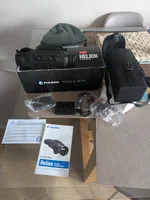
For Sale: Pulsar Quantum xq 50 spotter

waggy 1

Well-Known Member
Selling my spotter as now use one with built in lrf
It’s been a great thermal with no known issues, tidy used condition £1000 Ono posted
 

Attachments

  • 1A44863D-C011-43F4-AA08-9F7ECF38E9C6.webp
    1A44863D-C011-43F4-AA08-9F7ECF38E9C6.webp
    160.8 KB · Views: 217
  • 5B7A1396-6A9F-48A8-B90F-ED8A4ED51E1D.webp
    5B7A1396-6A9F-48A8-B90F-ED8A4ED51E1D.webp
    377.7 KB · Views: 221
  • 5D5F7159-D43F-47C7-923B-21859654158A.webp
    5D5F7159-D43F-47C7-923B-21859654158A.webp
    386.3 KB · Views: 230
Last edited:
On your photograph of the kit you're selling there is a short cable with a single black connector at one end and 2 connectors (one black and one white) at the other end
That is the cable used for video out (and DC power in)
The white connector has the video signal
The end with the single connector goes to the Pulsar
The connector on the Pulsar and the cable are shown in the manual
Be VERY careful when plugging the connector into the Pulsar as there are lots of small pins and the connector only goes in one way - DO NOT FORCE IT
With the connector plugged into the Pulsar you'll need a cable to plug into the white connector (it's a standard RAC or phono connector) and the other end of that cable plugged into a TV or something that has a video input with the same type of connector.
Switch on the Pulsar and go into the menu and go to the video output selection tab and set it to PAL
Now the TV should show what the Pulsar is seeing

Cheers

Bruce
 
On your photograph of the kit you're selling there is a short cable with a single black connector at one end and 2 connectors (one black and one white) at the other end
That is the cable used for video out (and DC power in)
The white connector has the video signal
The end with the single connector goes to the Pulsar
The connector on the Pulsar and the cable are shown in the manual
Be VERY careful when plugging the connector into the Pulsar as there are lots of small pins and the connector only goes in one way - DO NOT FORCE IT
With the connector plugged into the Pulsar you'll need a cable to plug into the white connector (it's a standard RAC or phono connector) and the other end of that cable plugged into a TV or something that has a video input with the same type of connector.
Switch on the Pulsar and go into the menu and go to the video output selection tab and set it to PAL
Now the TV should show what the Pulsar is seeing

Cheers

Bruce
Brilliant information Bruce, many thanks I will try that later 👍👍
 
Back
Top