LABEL PRINTER chat

Antonyweeks

Well-Known Member
Hi
So for the first time Christmas just gone I had more orders for venison than venison in the freezer. Which was great. I've now picked up some new customers too. Currently I butcher the animals and then vac pac and simply write on the bag what it is: 500g diced, red, Jan 2023 for example. Speaking with a friend of mine and having had a visit from the local council for health etc etc, it seems I ought to have labels for the packs which denote date shot, etc etc. There are loads of label printers out there and I definitely don't want to become super professional about this, so wondered what other folks did?
 
ive got a brother QL-800, good for my use, nice labels and a number of different size options. managed to get it in sale think about £80 or so
 
I'm using standard Avery type labels in a normal printer. A4 sheets are available in loads of sizes including freezer safe ones.
I just use the Avery online label designer. It can be a bit slow as there are a few steps you have to do to get it onto your printer, but might be worth a go before you splash out on a dedicated printer.
If you're any good with Word and the like, I'm sure you can set it up to do labels.
 
Hi
So for the first time Christmas just gone I had more orders for venison than venison in the freezer. Which was great. I've now picked up some new customers too. Currently I butcher the animals and then vac pac and simply write on the bag what it is: 500g diced, red, Jan 2023 for example. Speaking with a friend of mine and having had a visit from the local council for health etc etc, it seems I ought to have labels for the packs which denote date shot, etc etc. There are loads of label printers out there and I definitely don't want to become super professional about this, so wondered what other folks did?

@willie_gunn
 
Brother label printer is good.

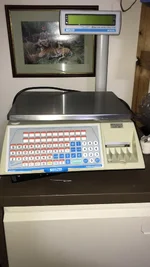
If you can find one, I would highly recommend a programmable set of scales which incorporate a label printer….

1. Place product on scale,
2. enter PLU (programmed by yourself to include information relevant to your business/product)
3. Press print - hey presto, a label specific to that products weight, £/Kg etc

New ones come in at £1,000+, but if you get lucky, you will find something second hand for £400-500 ish.

I have acquired one of these recently (@Freeforester) and haven’t looked back, the amount of time saved in printing, writing on labels etc, and the product looks far more professional. I know you may have only a limited/smaller supply amount at the moment, but well worth considering if you may increase your output in the future.

Try searching for Avery Berkel label scales on FleaBay

RS
 

Attachments

  • E0113070-D860-4390-A63D-7D380B572FA1.webp
    E0113070-D860-4390-A63D-7D380B572FA1.webp
    109.6 KB · Views: 67
  • 9B0C9C11-DA79-4983-9EE8-92DE382F4F36.webp
    9B0C9C11-DA79-4983-9EE8-92DE382F4F36.webp
    109.3 KB · Views: 67

just had a quick look on flea bay…….
 
Thanks @Grand Slam and @sh1kar

@Antonyweeks - the Brother printers are very good - I've been using a Brother QL-700 that I bought cheap off eBay for several years now. There are a couple of other threads discussing this same topic here and here.

I produce a label like this, though I've since added Cull Date to it as well:

Example Label.jpg

I use a spreadsheet to enter all the details of the different cuts from each animal, and then the Brother P-Touch software merges this sheet with a label template and squirts out the completed labels.

I also print out my own Hunter Declaration label that I attached to a parcel tag and tie to the carcass. This is only so that the carcass is labelled in the chiller if the Health Inspector calls, as I process all the carcasses I shoot at home.

If you decide to go this route then I'd suggest to stick with the original Brother labels, as the quality is better than the generics.

Let me know if you have any questions.
 
 
I bought a brother 570 off eBay. Haven’t figured out how to merge the spreadsheet with the brother software but that is just because I need a new computer. The painter works fine.
 
Thanks, as usual, for all the help and replies. I've ended up buying a 2nd hand Brother QL 810 off ebay for about £60! :)

Well done!

Once you've got it all installed then happy to share the template file and label I use if that would help at all - just ping me a PM with your email address. The P-Touch software is not the most intuitive, but once it's set up then it happily churns the labels out.

Together with using pre-cut vacuum bags the labels certainly make the finished venison product look a lot more professional.
 
Best speak to your local authority about labelling requirements
QUID statements if a processed product
Allergen info / training ( Natasha’s law)
Best before & or use by dates etc

Paul
 
Thanks @Grand Slam and @sh1kar

@Antonyweeks - the Brother printers are very good - I've been using a Brother QL-700 that I bought cheap off eBay for several years now. There are a couple of other threads discussing this same topic here and here.

I produce a label like this, though I've since added Cull Date to it as well:

View attachment 292743

I use a spreadsheet to enter all the details of the different cuts from each animal, and then the Brother P-Touch software merges this sheet with a label template and squirts out the completed labels.

I also print out my own Hunter Declaration label that I attached to a parcel tag and tie to the carcass. This is only so that the carcass is labelled in the chiller if the Health Inspector calls, as I process all the carcasses I shoot at home.

If you decide to go this route then I'd suggest to stick with the original Brother labels, as the quality is better than the generics.

Let me know if you have any questions.
That looks great, how / where did you get the Roe deer silhouette?
 
Back
Top