BT HomeHub converted to run OpenWRT - a router you control and which has a granular firewall

zambezi

Well-Known Member
It turns out that the BT HomeHub can be converted to run OpenWRT.

Why is this good? Because OpenWRT unlocks a lot of the hardware and security available in that ubiquitous consumer platform. You can build iptables/NFtables, set up less-hackable WPA3 wifi, truly partition guest or other users into vlans, prevent IOT devices from "calling home" by placing them in a zone with no WAN access...etc.


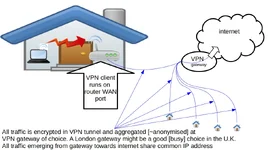
One other nifty feature about a BT HomeHub running OpenWRT is that you can configure a VPN on the router.

So, instead of having to apply VPN software to every device in your home, you apply that to the router only. This delivers:
  • all traffic leaving your home is encrypted and thus not subject to ISP meta-data profiling/monitoring/throttling-based-on-traffic-type
  • traffic is emerging into internet at preferred geolocation as just one of many other user streams and thus anonyimised and less subject to user-profiling
 
One other nifty feature about a BT HomeHub running OpenWRT is that you can configure a VPN on the router.

So, instead of having to apply VPN software to every device in your home, you apply that to the router only. This delivers:
  • all traffic leaving your home is encrypted and thus not subject to ISP meta-data profiling/monitoring/throttling-based-on-traffic-type
  • traffic is emerging into internet at preferred geolocation as just one of many other user streams and thus anonyimised and less subject to user-profiling
I'd love to know what this means. It sounds like a good idea. But I've no idea how to do it.
 
I'd love to know what this means

1722174998361.webp


I've no idea how to do it.

Before lockdown I did not have a radio HAM licence and I had no idea how to make a custom knife. I can do both passably now. We all gotta start somewhere. The links above are really clear, and stop/starting MarcOneFifty's videos allows you to assimilate each step and re-parse instructions if unclear. This is not easy, but it is do-able.
 
A few more REALLY good videos that show the whole process in very simple steps.

Excellent example of router case opening, serial cable connection and UART console prep all the way to closed router case:


Excellent overview of how a VPN works and how to install it on OpenWRT:
 
  • Like
Reactions: urx
Just in the last month, a very good reason to review your home router: FBI and NSA have issued statements about SOHO router vulnerabilities which allow unauthorised access. [it is the global scale of this risk that elevates it from run-of-the-mill low-grade CVE stuff]

At very minimum, reboot and update your off-the-shelf router firmware. [better: start the project above]

Do your own research. Key phrase for that search is "ORB network"


1778239712599.webp 1778239737500.webp


An alternate approach is to assume that your ISP-supplied/internet-facing device is untrustworthy. To protect yourself and your family's data, build a router that connects to the lan port of the internet-facing router. Not as tricky as it sounds. Loads of [cheap] projects out there using re-purposed computers with dual lan ports, Raspberry Pi hardware, or [mid-tier] Raspberry Pi+managed switch, or dedicated commercial platforms [expensive] running pfSense from Netgate.

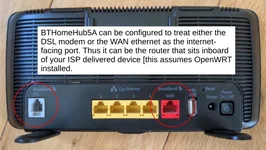
Circling back to my OP, the BTHomehub5A can be repurposed [using OpenWRT] to operate as that router that sits inboard of your ISP modem. I.e. the original deployment was to replace the ISP router altogether and in that case the DSL port was configured to mimic the ISP's device. Whereas in this [ethernet] scenario, the devices work in tandem. Indeed, some ISPs decline user-supplied routers from connecting to their network, so this is the good alternate.


1778242733693.webp
 
It's all a foreign language to me no doubt useful to those that spikka da lingo !

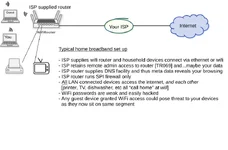
You are probably not alone. My professional life pre-retirement was in I.T. So to help folk visualise the proposition in this thread, here are images depicting the typical client broadband installation, and what is possible with OpenWRT.


Typical consumer set up now:

1779023401056.webp
Augmented consumer set up possibility:


1779023449357.webp


And if you have read this far, this is probably of interest to you. My offer to the first five who take up this offer is to install the firmware and configuration that will deliver this functionality for FREE. [You supply the donor router and preferred configuration parameters such as WiFi name, etc]
 
Back
Top