Alpex 4K LRF Ballistic Calculator Query

georgedoubleyou

Well-Known Member
Hi All,

I have a question (more than likely a stupid one) about setting up the ballistic calculator on my new Alpex 4K LRF.

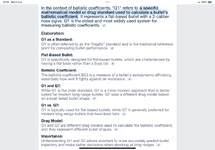
I'm putting in all of the numbers it needs like velocity/ballistic coefficient etc. which I can get from the box the bullets come in, but I'm not sure what to put in the bullet type section (G1,G4 etc.). I can't seem to find the answer online.

I'm using 243 Hornady V-Max 58gr. If anyone can point me in the right direction or even tell me the answer if they're using the same it would be much appreciated.

Thanks
 
Hi All,

I have a question (more than likely a stupid one) about setting up the ballistic calculator on my new Alpex 4K LRF.

I'm putting in all of the numbers it needs like velocity/ballistic coefficient etc. which I can get from the box the bullets come in, but I'm not sure what to put in the bullet type section (G1,G4 etc.). I can't seem to find the answer online.

I'm using 243 Hornady V-Max 58gr. If anyone can point me in the right direction or even tell me the answer if they're using the same it would be much appreciated.

Thanks
Put G1 in , I’m using 65 grn Vmax in my 243
 
OP....as Colin G said use G1 as your standard but the best way is to validate the trajectory by shooting targets out to your maximum intended range and then tweaking either the BC or the velocity to bring the calculated arc into something approximating real life.
I will zero at 100m and then test it on gongs out to 400m, tweaking the speed (either increasing or decreasing) until I am hitting all targets as pinged and calculated by the Alpex
 
Excellent, thank you both very much! Im not too fussed about my 243 as the land I shoot on doesn't really have anywhere that would present overly long shots but I intend to use it on my FAC 22. airgun which it will be much more useful on
 
Last edited:
OP....as Colin G said use G1 as your standard but the best way is to validate the trajectory by shooting targets out to your maximum intended range and then tweaking either the BC or the velocity to bring the calculated arc into something approximating real life.
I will zero at 100m and then test it on gongs out to 400m, tweaking the speed (either increasing or decreasing) until I am hitting all targets as pinged and calculated by the Alpex
Regarding tweaking the speeds , if after entering all the data and shooting at 300 yds the shot goes high do I need to increase or decrease the speed into the BC ?

Thanks
 
Regarding tweaking the speeds , if after entering all the data and shooting at 300 yds the shot goes high do I need to increase or decrease the speed into the BC ?
You will need to increase it
 
Last edited:
G1 on 150gr game king in my .270 it didn't matter as I also was trying to overthink the data input when i got mine ! At 600yrd it was the the same results .
 
Hi All,

I have a question (more than likely a stupid one) about setting up the ballistic calculator on my new Alpex 4K LRF.

I'm putting in all of the numbers it needs like velocity/ballistic coefficient etc. which I can get from the box the bullets come in, but I'm not sure what to put in the bullet type section (G1,G4 etc.). I can't seem to find the answer online.

I'm using 243 Hornady V-Max 58gr. If anyone can point me in the right direction or even tell me the answer if they're using the same it would be much appreciated.

Thanks
Scroll down, it's all there:

 
Regarding tweaking the speeds , if after entering all the data and shooting at 300 yds the shot goes high do I need to increase or decrease the speed into the BC ?

Thanks
Nickb....If shooting high you need to increase the speed in the ballistic calculator in order to "flatten" the curve. More speed equals less elevation adjustment...lower speed equals increased elevation adjustment
 
Nickb....If shooting high you need to increase the speed in the ballistic calculator in order to "flatten" the curve. More speed equals less elevation adjustment...lower speed equals increased elevation adjustment
Thanks for that 👍
 
Back
Top