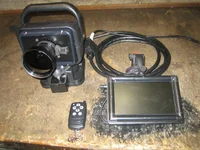
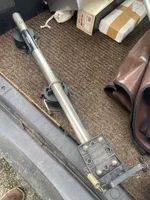
thermal roof mount

I have a guide track ir50 screwed onto the mount below with a magnet on the bottom which sits on the roof of the truck and links to the tablet on the dash, works very well.
 
I've made several, but they have all used discreet thermal cores and lenses rather than an off the shelf thermal imager converted to a roof mount
This is what i've been using for a few years now.
roof mount ti 1.webp
If I was to build a roof mount now, the Hague pan and tilt in the post above would be my starting point.

Cheers

Bruce
 
I have built a couple of roof mounts using the Hague and the main issue is that, in standard form, the remote control cable from the operator to the hague gets dragged around when it's rotating.
I'm just starting work on a roof mounting system based on the Hague with continuous rotation (as opposed to 340 degree rotation) which will have wireless control of the pan and tilt - so no wires back to the vehicle and the thermal connected to a phone or tablet via its wifi hot spot
Basically, the hague would stick to the vehicle roof with a magnet and there would be a box mounted onto the hague containing batteries to power the hague, thermal and wireless receiver. The box would also contain the wireless receiver and a green laser which, when powered up would show what direction the thermal is pointing.
This is useful when you get disorientated and can't recognise what direction the thermal is looking
The thermal itself would mount on top of the box using the standard 1/4 UNC camera thread that appears to be present on almost every thermal spotter I've looked at.

Cheers

Bruce
 
I have built a couple of roof mounts using the Hague and the main issue is that, in standard form, the remote control cable from the operator to the hague gets dragged around when it's rotating.
I'm just starting work on a roof mounting system based on the Hague with continuous rotation (as opposed to 340 degree rotation) which will have wireless control of the pan and tilt - so no wires back to the vehicle and the thermal connected to a phone or tablet via its wifi hot spot
Basically, the hague would stick to the vehicle roof with a magnet and there would be a box mounted onto the hague containing batteries to power the hague, thermal and wireless receiver. The box would also contain the wireless receiver and a green laser which, when powered up would show what direction the thermal is pointing.
This is useful when you get disorientated and can't recognise what direction the thermal is looking
The thermal itself would mount on top of the box using the standard 1/4 UNC camera thread that appears to be present on almost every thermal spotter I've looked at.

Cheers

Bruce
just bought an hague last night . got it for £60 pounds of ebay
 
i use the lightforce roof mount with my Quantum XQ50 Spotter +5"" Screen
and i find if you use a bigger screen it lights up the cab to much
 
I use an Apex XQ50 LRF roof mounted to a weaver rail fixed to my lightforce handle. The Apex is on a QD mount and attaches to the weaver rail in seconds, connected to the video out. When I need to use it rifle mounted I can within seconds, but to be honest it's my permanent vehicle mounted unit now. When I get to the land I'm shooting on , I just clip it on and I'm away, I just use the EPS3 powerpack thats lasts all night rather than run additional leads for power. I must admit for my style of shooting, traveling down farm tracks and covering lots of land, the unit mounted to a lightforce bar offers very rapid 360deg scanning and precise position for when combining with the LRF and pinpointing on small heat signatures..

In fact I could not live without this setup, it gives me full coverage at height, rapid scanning and on screen distance display , I do not use a spotter from the vehicle at all only when on foot...for me this setup is beyond value and probably my most valuable hunting tool.
 
Older thermals Like the Pulsar HD, XD and XQ models all had analog video outputs so can be hard wired to a cheap LCD screen inside the vehicle.
Almost all current thermals use wifi so can connect to a phone or tablet using a suitable app.
Beware, some apps are a LOT better than others.
The Pulsar Steamvision app (v1 and V2) does not have a good reputation
I've used the Guide app and the HIK app and they work fine with their respective thermals.

Cheers

Bruce
 
Older thermals Like the Pulsar HD, XD and XQ models all had analog video outputs so can be hard wired to a cheap LCD screen inside the vehicle.
Almost all current thermals use wifi so can connect to a phone or tablet using a suitable app.
Beware, some apps are a LOT better than others.
The Pulsar Steamvision app (v1 and V2) does not have a good reputation
I've used the Guide app and the HIK app and they work fine with their respective thermals.

Cheers

Bruce
chears bruce i know a lot about night vision units but nothing about the thermals. think i will give you a shout befor i buy one for the roof mount
 
Of the current crop of thermals, I know that the Guide Track IR models have both wifi and an HDMI video output that can be hardwired to an LCD screen with an HDMI connector.
In fact I had a Guide Track IR50 on trial and had it connected to a screen via an HDMI cable and connected by wifi to a phone at the same time to see how much wifi lag there was when I scanned the thermal around.
There was virtually no lag and the my impression is that the Guide Track IR50 would make an excellent roof mounted spotter.

Cheers

Bruce
 
Back
Top