From the look of
this post, I -and anyone else who has one of these- would be well advised to give our new cameras a thorough test run.

Just to clarify my post on the other thread:
On default settings, or triggered manually in test mode, the camera worked OK (apart from the intermittent triggering).
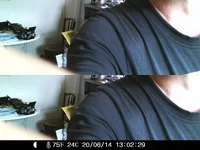
However I set it up to take three photos at 5 second intervals, followed by a 1 minute video. When set up this way, very frequently at least one of the photos was corrupted. Both cameras had the same problem, which was easily reproduced. I will try to attach an example.
I attribute the poor triggering to a problem with the side sensors. On one of my cameras they did not work at all. On the other they sometimes worked, but seemed to have poor sensitivity.
The camera relies on the side sensors to "wake it up" from its low power state. Once woken up, which seems to take several seconds, it then responds to the central sensor in "under 1 second" according to the manual. If the side sensors are switched off in the menu, or otherwise not working, the camera is very unresponsive.
I set up the functioning camera on the landing halfway up my staircase. This should be a perfect location to test it as I walk past it many times per day, and the side sensors look up and down the staircase, so should wake up the camera every time. I kept a note and found it triggered less than 50% of the time, and frequently the picture did not include me, i.e. it had not triggered in "under 1 second" but had been considerably delayed and I had walked past it before it responded.
You can test the sensors easily. In test mode a red led flashes when the centre sensor is triggered (this was reliable), and a blue LED shows when the side sensors are active.
Perhaps I had two faulty cameras. Please could some other owners test their sensors and report your findings.
I found the software buggy. As I said, you cannot just switch the camera from off to on. You have to pause in test mode until the camera has booted up fully (with annoying loud jingle tune), only then can you move the switch over to the on position, when the display will show a 5 second countdown (30 seconds would be better) before the display turns off and the camera is live.
If you fail to let it boot fully the camera often locks up and the batteries have to be removed to reset it.
On many occasions the camera also would not switch from "on" to "test" to review the photos, and needed battery removal to reset it.
Several times when the camera had locked up and I pulled the batteries to reset it, it reverted to default settings and I had to re-program it.
The instructions do mention this "feature" and helpfully direct you to remove the batteries in case of lockup/crashing. I have never before experienced such buggy behaviour and found it quite unacceptable.
The bright red LED illumination is unmissable, and would give away the camera location to any human who passed it at night. And probably risks startling animals.
In daylight the white/clear LEDs are very obvious and would make it difficult to hide. The black filtered LEDs used on other trail cameras are far more discrete, or a piece of black IR transmissive foil over the LED window, would tone down the appearance and might reduce the visible red light spill. Better still use "invisible" 940 nm LEDs.
I also tried monitoring a garden bird table, but it was not sensitive enough for small birds to trigger it, which was a pity.
The sound recording on videos was very poor, actually quite useless. And as said I am suspicious that even the 720/30fps video is upscaled. I should have tried the VGA 1024x768 setting, which might be better if this is the native resolution, as I suspect.
I am also doubtful about the longevity of the power connection from the battery box to the camera, which seems to be very fine wire running through the upper hinge, which gets twisted 180 degrees every time the back is opened.
This is the MK 3 version of the Aldi camera. IMHO it needs a firmware update to fix the bugs and crashes, more discrete LEDs with less red light spill, and better lateral PIR sensors.
Meanwhile I am considering the latest Acorn Third Generation Ltl-5310A Camera With 940nm LED 720P Video 44 IR LEDs which is available on Amazon for £99. I'd appreciate feedback from any owners.
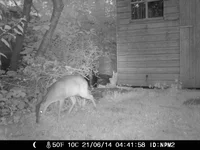
This image shows the corruption. Only half of the image is captured, and it is repeated in a strange split screen effect.


 put up a post for someone to get and post you one feller