


One fox I am after is proving particularly wary/canny and I realise I need to switch up my hunt methodology. Currently if I lie in wait, he winds or sees me. In part, I am disadvantaged as the permission is made up of small parcels of land so any encounter will be at close quarters. I have tried using bait to distract/direct his attention but that has not yet worked in daylight hours.
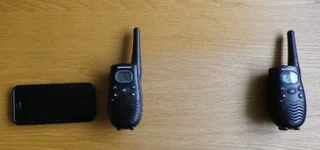
What I plan to try next is remote audio decoy under cover of night. I have a NiteSite, but no remote caller. Looking at prices, the progammable remote decoys are a bit expensive so I got to wondering if I could make one. Some years back I bought PMR [walkie talkie] radios for use while hiking. So I already have the hardware I need to broadcast a call into a remote field.
Using the following I have built a progammable remote fox caller. You can add, create, delete any call you need using this method.
So here's the build sequence:
• Record free distress calls from youtube onto your smart phone's Voice Memo app
• Now install VLC app on your smart phone
• Open Voice Memo and share call with VLC [opens automatically]
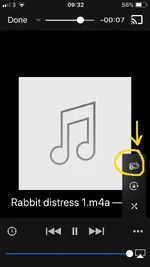
• Select the ... option in VLC and set the call to loop [see screengrab below]
• Switch both PMR radios on, place one at bait site in field and retain sending unit with yourself
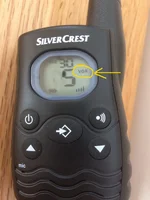
• Set the sending unit to "vox mode" so that you do not need to press-to-talk [see screengrab below]
• Start the distress call loop on VLC app and bundle smart phone and vox enabled PMR radio in a coat or bag to mute broadcast from that point [volume set to max on receiving radio at bait site]
What I plan to try next is remote audio decoy under cover of night. I have a NiteSite, but no remote caller. Looking at prices, the progammable remote decoys are a bit expensive so I got to wondering if I could make one. Some years back I bought PMR [walkie talkie] radios for use while hiking. So I already have the hardware I need to broadcast a call into a remote field.
Using the following I have built a progammable remote fox caller. You can add, create, delete any call you need using this method.
So here's the build sequence:
• Record free distress calls from youtube onto your smart phone's Voice Memo app
• Now install VLC app on your smart phone
• Open Voice Memo and share call with VLC [opens automatically]
• Select the ... option in VLC and set the call to loop [see screengrab below]
• Switch both PMR radios on, place one at bait site in field and retain sending unit with yourself
• Set the sending unit to "vox mode" so that you do not need to press-to-talk [see screengrab below]
• Start the distress call loop on VLC app and bundle smart phone and vox enabled PMR radio in a coat or bag to mute broadcast from that point [volume set to max on receiving radio at bait site]


