PARD Night Stalker 4K LRF 2.0 Manual/Video on Zeroing/Ballistic Set-Up

wytonpjs

Well-Known Member
Help!

Purchased from Blackwood Outdoors. There only a quick start guide in the box and I'm struggling to zero it. The PARD US site doesn't list this under downloads and none of their videos match what I'm seeing under the zeroing/ballistic calculators screens. Trawling the WWW and You Tube I cannot find anything - the menus I'm seeing are very different to the other versions of the Night Stalker - HELP! I consider myself no tech newbie but this has tables and menu items I haven't seen before on any of my Alpex's.

No answer from Blackwood Outdoors - can anyone here help please 🙏

It seems to have been out in Europe first for about a month but there's no EU website, just a FB and Insta page. This is my first experience with a Pard and it's like pulling teeth.
 
The manual is in the Pard app, under device settings.
You will need to connect the unit to the app, otherwise it will not show the manual.


Last edited:
@Scooby67 Thanks, that worked although I cannot see a way to save so have reverted to screenshots.

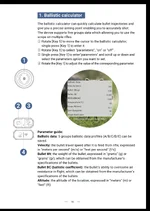
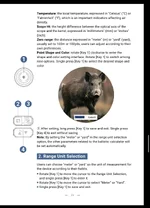
The points where I’m getting confused (I think) are the ballistics and the reticule alignment.

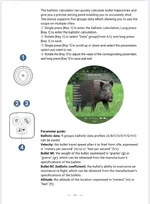
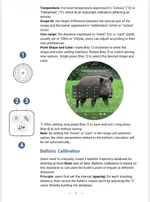
Ballistics - you get 3 menu options: Ballistic Calculation, Ballistic Calibration and off.

I have entered my ballistic data and saved this as the A profile using the Ballistic Calculation menu. Then, you get the Ballistics Calibration menu option which is where I was seeing the tables. Reading the “manual” I now see the Calibration menu gives you a way to enter bullet drop at various distances - I’m presuming this has been provided as a way of allowing you to set up the ballistics if you don’t have accurate G1 data (disappointed to see that the Calculation menu will not take G7 data). However, as I have good G1 data for the round, there’s nothing in the manual to say how I disable the Calibration data. I’m hoping that by setting the data in profile A, that will be applied if A is selected.

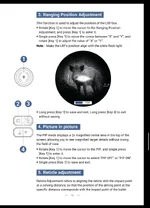
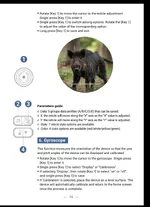
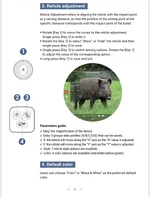
Zeroing - I see this is called Reticule Adjustment. From looking at Pard’s other videos I understand that you move the X and Y values to the bullet hole leaving the crosshairs on the POA. I will give this a go later this morning on the range.

Real confusion for me is whether the entered Ballistic Calculation data takes precedence over the Ballistic Calibration - I’m presuming the off setting completely turns off the Ballistic function in the device. Having ‘played around’ with the Calibration menu do I need to make sure all of the values in there are zero?

Hopefully, this isn’t going to take too many rounds to sort out! One disappointment is that whilst the eyepiece screen appears stunning when looking at it in the house, on the range yesterday I was struggling to get the screen bright enough to clearly see a target at 25m! It was a bright day and the range orientation was such that the sun was coming in from the right 2 o’clock position hampering visibility of the ocular and having seen how bright/clear the picture was in the house, I stupidly hadn’t put the screw-in supplied bellows in my range bag. Result - my first scope bite in years!

Suffice to say, I’m not liking this device at present - hopefully that’ll change after I can get the set-up done properly 🙇🏻‍♂️

IMG_5951.webpIMG_5952.webpIMG_5953.webpIMG_5954.webp
 
Thats a real faff for you......just a thought, have you got an air rifle? Maybe use that to set up and work out the ballistic input method before using it on a CF and burning through components......lot cheaper to check the drops BC input method works that way ......?

If not, have one with a very low SD that you can borrow if you want.
 
Thats a real faff for you......just a thought, have you got an air rifle? Maybe use that to set up and work out the ballistic input method before using it on a CF and burning through components......lot cheaper to check the drops BC input method works that way ......?

If not, have one with a very low SD that you can borrow if you want.
Thanks - off to Severnside in a few minutes. Hopefully by lunchtime I'll be in a happier place. Severnside range is due East though so bellows is in the range bag 🤦‍♂️
 
@Scooby67 Thanks, that worked although I cannot see a way to save so have reverted to screenshots.

The points where I’m getting confused (I think) are the ballistics and the reticule alignment.

Ballistics - you get 3 menu options: Ballistic Calculation, Ballistic Calibration and off.

I have entered my ballistic data and saved this as the A profile using the Ballistic Calculation menu. Then, you get the Ballistics Calibration menu option which is where I was seeing the tables. Reading the “manual” I now see the Calibration menu gives you a way to enter bullet drop at various distances - I’m presuming this has been provided as a way of allowing you to set up the ballistics if you don’t have accurate G1 data (disappointed to see that the Calculation menu will not take G7 data). However, as I have good G1 data for the round, there’s nothing in the manual to say how I disable the Calibration data. I’m hoping that by setting the data in profile A, that will be applied if A is selected.

Zeroing - I see this is called Reticule Adjustment. From looking at Pard’s other videos I understand that you move the X and Y values to the bullet hole leaving the crosshairs on the POA. I will give this a go later this morning on the range.

Real confusion for me is whether the entered Ballistic Calculation data takes precedence over the Ballistic Calibration - I’m presuming the off setting completely turns off the Ballistic function in the device. Having ‘played around’ with the Calibration menu do I need to make sure all of the values in there are zero?

Hopefully, this isn’t going to take too many rounds to sort out! One disappointment is that whilst the eyepiece screen appears stunning when looking at it in the house, on the range yesterday I was struggling to get the screen bright enough to clearly see a target at 25m! It was a bright day and the range orientation was such that the sun was coming in from the right 2 o’clock position hampering visibility of the ocular and having seen how bright/clear the picture was in the house, I stupidly hadn’t put the screw-in supplied bellows in my range bag. Result - my first scope bite in years!

Suffice to say, I’m not liking this device at present - hopefully that’ll change after I can get the set-up done properly 🙇🏻‍♂️

View attachment 473975View attachment 473976View attachment 473977View attachment 473978
Yeah in the ballistic menu, can't see how to turn it on and off, permanently showing off.
Ian has fed this back to Pard.

Haven't played around with the Ballistic Calibration.
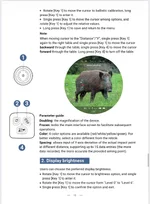
To get a better picture in the display, try adjusting the exposure .
 
Back
Top