Uploading pictures again!

JH83

Well-Known Member
I know it’s old news but this has really only kicked in for the last few weeks/months. before it’s always been fine. I have tried emailing to myself, saving as a file on my phone, cropping pictures. It says wrong format on original photos I don’t really want to pay £13 a month for acrobat just to post on here! On cropped photos it says too large.

Any advice?
 
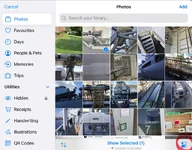
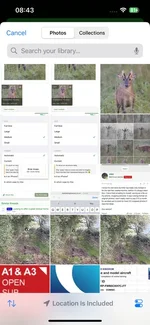
Before you upload them, having selected the pictures to use, click on the slider buttons at the bottom of the screen, tick large and then add. This is for iOS I should add - no idea about Android!

IMG_0834.jpegIMG_0835.jpeg
 
I know it’s old news but this has really only kicked in for the last few weeks/months. before it’s always been fine. I have tried emailing to myself, saving as a file on my phone, cropping pictures. It says wrong format on original photos I don’t really want to pay £13 a month for acrobat just to post on here! On cropped photos it says too large.

Any advice?
I only load pictures from my phone to the laptop, lots of people use their phone for everything but tbh the screen is too small for decent detail, not much help but that is what I do.
This is off my sat cam to the phone to the laptop from this morning, there will be a member along with a fix I am sure.
12x8 is better than 5x3 in my opinion
20250910021236[1].webp
 
I only load pictures from my phone to the laptop, lots of people use their phone for everything but tbh the screen is too small for decent detail, not much help but that is what I do.
This is off my sat cam to the phone to the laptop from this morning, there will be a member along with a fix I am sure.
12x8 is better than 5x3 in my opinion
View attachment 436563

I’m stuck on me phone sadly

Only ‘puter I have is works one and I’d imagine they’d be less than impressed being on SD 🤣
 
I’m stuck on me phone sadly

Only ‘puter I have is works one and I’d imagine they’d be less than impressed being on SD 🤣
Get a lap dancer top :doh:
My std quote to people when they look surprised as they expect me to pay for an item with my phone is,
" there are still people around who don't run their lives' from a phone"

Anyway good luck.
Tim
 
I’m stuck on me phone sadly

Only ‘puter I have is works one and I’d imagine they’d be less than impressed being on SD 🤣
Is it an iPhone?

In which case try this.

First select the Picture icon from the top menu of the Edit box on SD. Click on "Drop image" and choose your Phone's photo album:

IMG_2596.png


When your photo album comes up you will see a "sliders" icon in the bottom-right of the screen, click on it:

IMG_2597.png

When you click on that icon, this screen should appear:

IMG_2598.png


Select the image size - it typically defaults to "Full Size", which is why you get the error message from SD saying the file size is too big, so select "Medium" instead and then click on “Done”:

Now select the photo you want from your Photo album and press “Done”

IMG_2601.png

Then hit on the "Post reply" icon.
 

Attachments

  • IMG_2603.webp
    IMG_2603.webp
    34.3 KB · Views: 2
Last edited:
Before you upload them, having selected the pictures to use, click on the slider buttons at the bottom of the screen, tick large and then add. This is for iOS I should add - no idea about Android!

View attachment 436555View attachment 436556

Thank you sir

For other struggling I changed to medium and most compatible format

There must of been a change to either site or IOS as a month ago it was not an issue

Thank you all respondents 🙏
 
Last edited:
Back
Top